Conversion Tracking Workflow: 2026 Step–by–Step Guide
Posted on
Marketing
Posted at

A conversion tracking workflow is a structured process for capturing, attributing, and analyzing user actions that drive measurable business outcomes across paid marketing channels. It requires defining macro and micro conversions, implementing layered tracking tools, and regularly validating data to ensure accurate campaign optimization.
A conversion tracking workflow is the structured process of capturing, attributing, and analyzing user actions that drive measurable business outcomes across paid marketing channels. Most marketers track clicks. The ones who scale revenue track meaningful conversions and tie every dollar spent back to a real result. This guide covers the full process: from defining conversion actions in Google Ads and GA4, to configuring Enhanced Conversions, to troubleshooting data gaps that quietly drain your budget. Whether you manage Google Ads, Meta campaigns, or both, this is the conversion tracking process built for 2026 realities.
What does a conversion tracking workflow actually require?
A solid conversion tracking workflow starts before you touch a single tag. The foundation is defining what counts as a conversion for your specific business goals. Get this wrong and every optimization decision downstream is built on bad data.
The two conversion types you must define:
Macro-conversions: High-value actions that directly drive revenue. Examples include purchases, booked calls, form submissions, and subscription sign-ups.
Micro-conversions: Smaller signals of intent. Examples include video views, add-to-cart events, scroll depth, and email clicks. These help you identify funnel drop-offs before they become revenue problems.
Core tools and prerequisites you need in place:
A tag management system such as Google Tag Manager or a server-side container
An analytics platform: GA4 is the current standard for web measurement
Google Ads and Meta Ads accounts with admin access for pixel and conversion action setup
First-party data collection: email addresses, phone numbers, and CRM data for Enhanced Conversions
A clear privacy policy and consent management platform (CMP) compliant with CCPA and GDPR
Website tagging readiness matters more than most teams realize. If your site fires tags inconsistently or lacks a data layer, your conversion data will have gaps from day one. Audit your tag coverage in Google Tag Manager before configuring any conversion actions.
Pro Tip: Assign a monetary value to every macro-conversion, even if it is an estimate. Value-based tracking lets Google Ads and Meta optimize toward revenue, not just volume. A $200 lead is not the same as a $2,000 lead, and your bidding strategy should reflect that.
How to set up conversion tracking step–by–step
A good conversion tracking setup follows a defined sequence: create conversion actions, configure tags, validate data, and build funnel views. Skipping steps creates attribution errors that compound over time.
Step 1: Create conversion actions in Google Ads

Go to Tools > Measurement > Conversions in Google Ads. Create a new conversion action and select the category that matches your goal (purchase, lead, page view). Set the conversion window to match your sales cycle. For B2B, 90 days is often more accurate than the default 30.
Step 2: Configure GA4 events and import to Google Ads
Set up key events in GA4 using Google Tag Manager. Mark high-value events as conversions inside GA4. Then import those GA4 conversions into Google Ads as secondary signals. This gives you cross-platform visibility without duplicating your primary bidding signal.
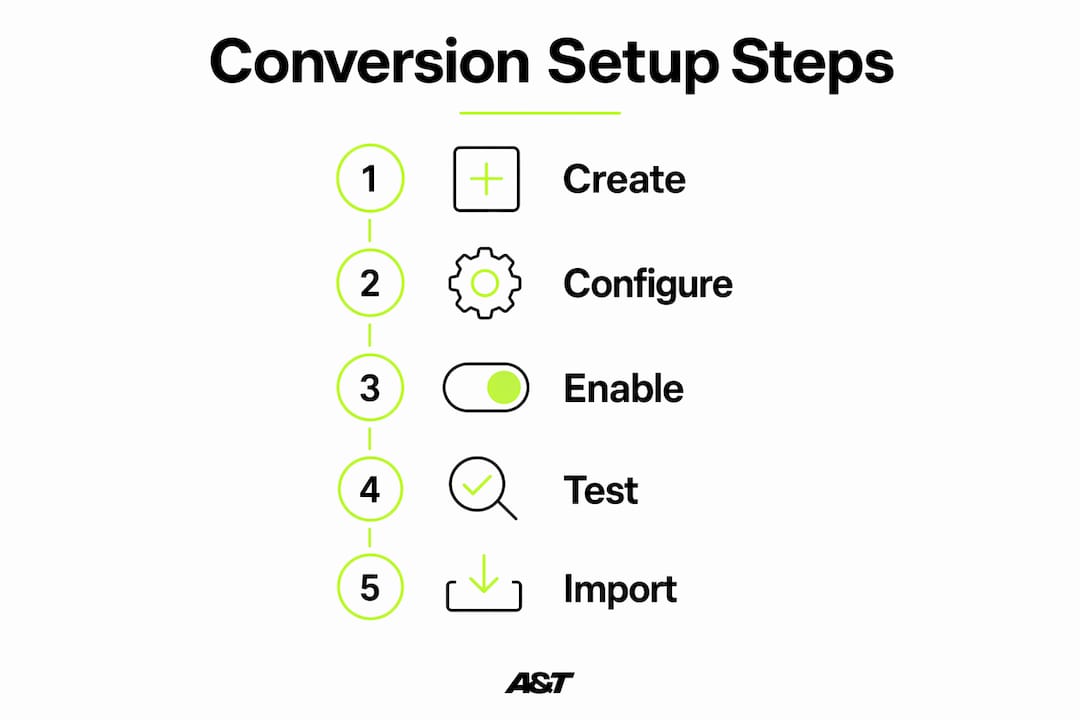
Step 3: Enable Enhanced Conversions
Enhanced Conversions use hashed first-party data (email, phone, name) to match conversions back to ad clicks even when cookies are blocked. Enhanced Conversions recover 5–15% of previously lost conversion data. That recovery directly improves Smart Bidding accuracy and reported ROAS.
Step 4: Configure Meta Pixel and Conversions API
Install the Meta Pixel via your tag manager. Then layer the Conversions API (server-side) on top. The Conversions API sends event data directly from your server to Meta, bypassing browser-level ad blockers and iOS privacy restrictions.
Step 5: Test and validate every conversion path
Use Google Tag Assistant, Meta Pixel Helper, and GA4 DebugView to confirm tags fire correctly. Test each conversion path as a real user would complete it.
Step 6: Import offline conversions
For businesses with phone sales or long sales cycles, offline conversion import maps CRM data back to the original ad click. This is critical for B2B campaigns where the gap between click and close can span weeks.
Tracking Method | Best For | Key Limitation |
|---|---|---|
Client-side pixel | Quick setup, ecommerce | Blocked by ad blockers and iOS |
Server-side tracking | Privacy resilience, accuracy | Requires developer setup |
Enhanced Conversions | Recovering lost attribution | Needs first-party data collection |
Offline conversion import | B2B, long sales cycles | Requires CRM integration |
Pro Tip: Never run both a native Google Ads tag and a GA4-imported conversion for the same action simultaneously. Double-counting conversions inflates your reported numbers and corrupts Smart Bidding signals. Pick one source of truth per conversion action.
What are common conversion tracking challenges?
Even a well-built tracking setup will develop problems over time. Browser updates, site changes, and platform policy shifts all create data gaps. Knowing where to look saves hours of troubleshooting.
The most common issues and their causes:
Data discrepancies between platforms: Google Ads, GA4, and Meta will never show identical numbers. Different attribution windows, counting methods, and session definitions all contribute. Expect a 10–20% variance as normal. Investigate when the gap exceeds that range.
Double-counting: Running a native Google Ads conversion tag and a GA4 import for the same event creates inflated conversion counts. Choose either native tags for primary bidding or GA4 imports for secondary events, not both.
Ad blocker and browser privacy impact: Safari's Intelligent Tracking Prevention and Firefox's Enhanced Tracking Protection block third-party cookies. This is why server-side tracking and Enhanced Conversions are no longer optional for accurate measurement.
Lost attribution from iOS 14+ changes: Meta campaigns in particular lost significant signal after Apple's App Tracking Transparency rollout. The Conversions API partially restores that signal by sending events server-to-server.
"Tracking that only works in a perfect browser environment is not tracking. It is wishful thinking."
The fix for most of these issues is a layered approach: client-side tags for speed, server-side containers for resilience, and Enhanced Conversions for recovery. No single method covers every scenario.
Pro Tip: Test conversions monthly using a separate browser profile with no extensions. Complete a real purchase or form submission and verify the conversion appears in Google Ads, GA4, and Meta within the expected window. This catches silent failures before they affect campaign optimization.
How do you analyze conversion data to improve performance?
Collecting conversion data is step one. Turning that data into better campaign decisions is where the real work happens. Most marketers look at the wrong numbers first.
Start with the right reporting columns in Google Ads:
The "Conversions" column shows only primary conversion actions set to "Include in Conversions." The "All Conversions" column includes primary, secondary, and view-through conversions. Reviewing both gives you a complete picture of campaign performance, not just the actions you optimized for.
Use funnel analysis to find drop-off points:
Map the full user journey from ad click to final conversion in GA4's Funnel Exploration report.
Identify the step with the highest drop-off rate. That is your highest-leverage optimization target.
Test landing page changes, offer adjustments, or form simplification at that specific step.
Measure the impact on both micro and macro conversion rates before scaling spend.
Adjust bidding based on conversion value, not volume:
Smart Bidding in Google Ads uses your conversion data to set bids in real time. If you feed it volume-only signals (all leads treated equally), it optimizes for quantity. Assign revenue values to conversions and switch to Target ROAS bidding. The algorithm will shift spend toward the clicks most likely to generate revenue, not just form fills.
Factor in offline and delayed conversions:
B2B campaigns often show weak in-platform ROAS because the revenue closes in a CRM weeks later. Mapping offline conversions back to original ad clicks gives Smart Bidding the full revenue picture. This single change frequently improves reported ROAS by 30–50% for clients with long sales cycles.
Reviewing primary versus all conversions on a weekly basis leads to more informed budget decisions and better campaign refinements over time. Build this review into your weekly reporting cadence alongside cost-per-conversion and conversion rate by campaign.
Key takeaways
A reliable conversion tracking workflow requires layered tracking methods, clearly defined conversion actions, and regular validation to produce data that actually improves campaign performance.
Point | Details |
|---|---|
Define conversions before setup | Separate macro and micro conversions to align tracking with real business goals. |
Layer tracking methods | Combine client-side pixels, server-side containers, and Enhanced Conversions for maximum data recovery. |
Prevent double-counting | Use either native Google Ads tags or GA4 imports per conversion action, never both simultaneously. |
Analyze both conversion columns | Review "Conversions" and "All Conversions" in Google Ads weekly for a complete performance view. |
Import offline conversions | Map CRM data back to ad clicks to capture revenue from long sales cycles in your ROI calculations. |
What I have learned building conversion tracking systems
The most expensive mistake I see digital marketers make is treating conversion tracking as a one-time setup task. They configure it at launch, assume it works, and never check again. Six months later, a site update breaks a tag, a GA4 event stops firing, or a Meta Pixel stops matching. The campaign keeps spending. The data keeps looking fine. But the optimization signals are garbage.
The second mistake is optimizing for the wrong thing. Clicks are easy to count. Leads are easy to count. Revenue is harder to attribute, so teams skip it. But value-based conversion tracking is the difference between a campaign that generates volume and one that generates profit. I have seen accounts triple their ROAS simply by switching from lead-volume bidding to revenue-value bidding after properly configuring offline conversion imports.
Privacy changes are not going away. iOS restrictions, third-party cookie deprecation, and consent requirements will keep tightening. The teams that invest in server-side tracking and first-party data collection now will have a structural advantage over those still relying on pixel-only setups. This is not a technical detail. It is a competitive edge.
If you want to go deeper on how this connects to your overall paid ads system, the performance marketing workflow guide at Atdigiagency covers how tracking integrates with bidding strategy and creative testing.
— Ann
Ready to build a tracking system that actually converts?
At Atdigiagency, we build and manage paid advertising systems where every conversion is measured, attributed, and fed back into campaign optimization. Our team configures Enhanced Conversions, server-side tracking, and offline conversion imports for clients across Google Ads and Meta. We do not just run ads. We build the measurement infrastructure that makes your ad spend defensible. If your current setup has data gaps, attribution errors, or you are not sure what your campaigns are actually generating, we can fix that. Explore our Google Ads management services or our Meta Ads management to see how we approach tracking-first campaign builds.
FAQ
What is a conversion tracking workflow?
A conversion tracking workflow is the end-to-end process of defining, capturing, attributing, and analyzing user actions that indicate business value across paid marketing channels. It includes tool setup, tag configuration, testing, and ongoing data review.
How do enhanced conversions improve tracking accuracy?
Enhanced Conversions use hashed first-party data to match conversions back to ad clicks when cookies are unavailable. This method recovers 5–15% of previously lost conversion data, improving Smart Bidding accuracy and reported ROAS.
What is the difference between "conversions" and "all conversions" in Google Ads?
"Conversions" count only primary actions set to be included in bidding. "All Conversions" includes secondary actions and view-through conversions, giving a fuller picture of campaign impact.
Why does my conversion data differ between Google Ads and GA4?
Platform differences in attribution windows, session definitions, and counting logic cause natural variance. A 10–20% gap is expected. Larger discrepancies usually point to double-counting, tag misfires, or mismatched conversion windows.
When should I use offline conversion imports?
Use offline conversion imports when your sales cycle extends beyond the standard conversion window or when revenue closes in a CRM rather than on your website. This is standard practice for B2B conversion attribution and any business with phone-based or delayed sales.