Conversion Tracking Setup Steps: A 2026 Guide
Posted on
Marketing
Posted at

Proper conversion tracking records user actions from paid ads and enables accurate performance measurement. It requires correct setup of tags, dynamic value passing, and verification across platforms using tools like Tag Assistant and Meta's Test Events. A hybrid approach of browser and server-side tracking ensures complete attribution, especially after privacy changes.
Conversion tracking is defined as the process of recording specific user actions, such as purchases, form submissions, or phone calls, that result directly from your paid ads. Getting the conversion tracking setup steps right is the difference between spending on instinct and spending on data. This guide covers both Google Ads and Meta (Facebook) tracking in full, from prerequisites through verification. Marketing professionals and business owners who follow these steps will measure ad performance accurately, feed their platforms better signals, and make smarter budget decisions.
What prerequisites and tools do you need before starting conversion tracking setup?
The right accounts and tools must be in place before you touch a single tag. Missing one prerequisite wastes hours of troubleshooting later.

You need active accounts in Google Ads and Meta Business Manager. You also need admin access to your website's code or a tag management system. Without edit access, you cannot place tracking tags where they need to go.
Google Tag Managergives you centralized control over both Google Ads and Meta Pixel installation, making event configuration and future updates far easier to manage. It removes the need to edit raw HTML every time you add or change a tag. For most marketing teams, GTM is the right starting point.
Tool | Role |
|---|---|
Google Ads account | Creates conversion actions and generates tracking tags |
Meta Business Manager | Manages Meta Pixel creation and Events Manager |
Google Tag Manager | Deploys and manages tags across platforms from one place |
Meta Pixel | Fires browser-side events from your website to Meta |
Conversions API (CAPI) | Sends server-side events directly to Meta, bypassing browser limits |
Meta Events Manager | Verifies pixel activity, configures events, and runs test tools |
Pro Tip: Grant GTM "Publish" access only to team members who understand tag firing rules. A misfired tag can inflate conversion counts and corrupt your campaign data overnight.
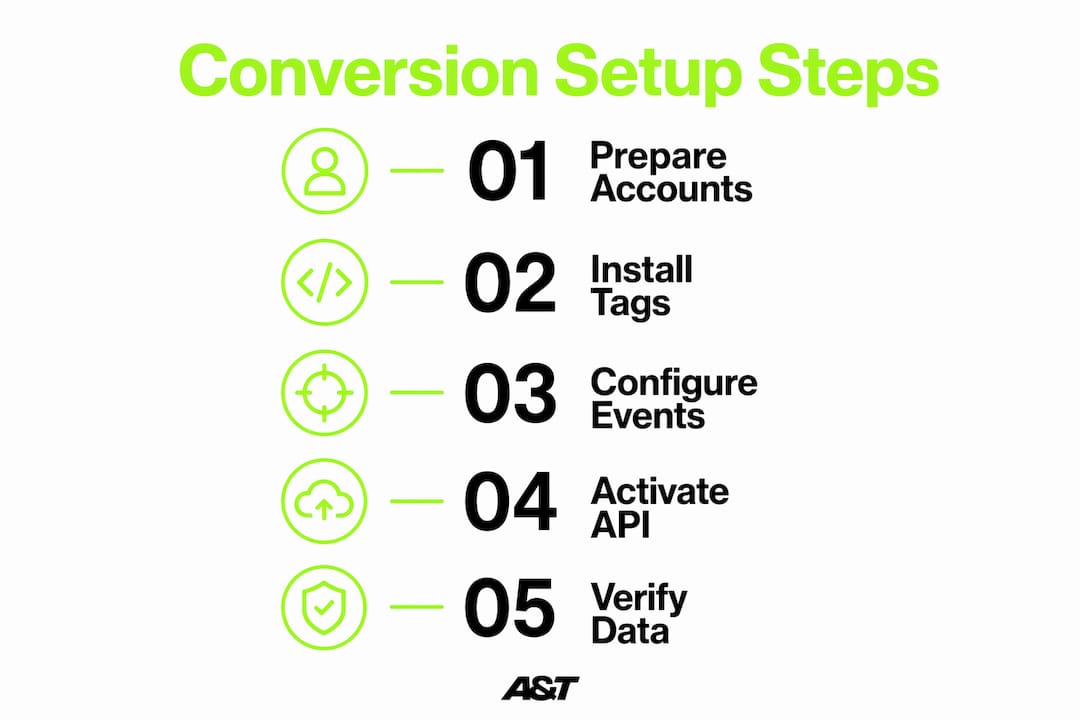
How do you set up Google Ads conversion tracking step by step?
Google Ads conversion tracking works through two components: a global site tag (also called the Google tag) and an event snippet. Both must be installed correctly for data to flow.
Create a conversion action. In Google Ads, go to Goals, then Conversions, then New Conversion Action. Choose "Website." Name the action clearly, for example "Purchase" or "Lead Form Submit." Set the category, value, and count settings before saving.
Install the Google tag on every page. Placing the global site tag on all pages is critical for collecting website-wide data. Add it to the
<head>section of your site template or deploy it through Google Tag Manager. One tag covers the entire domain.Add the event snippet to conversion pages. The event snippet fires only on the page that confirms a completed action, such as a thank-you page after a purchase. Place it below the Google tag in the page's
<head>or body, or configure it as a separate GTM tag triggered by the confirmation page URL.Pass dynamic values with every purchase event. Dynamic data layer variables such as
transaction_idandcurrencyshould be passed with event snippets for accurate ecommerce tracking. Your developer pushes these values into the data layer at checkout completion, and GTM reads them into the tag automatically.Avoid hardcoding static values. Hardcoding static conversion values prevents the ad platform from optimizing for actual revenue. A tag that always reports "$50" teaches Google's bidding algorithm nothing useful. Pull the real order value from the data layer every time.
Pro Tip: Set "Count" to "One" for lead generation conversions and "Every" for purchases. Counting every lead submission as a conversion inflates numbers and misleads your bidding strategy.
For a broader view of how this fits into your full campaign structure, the step-by-step ad campaign setup guide from A&T Digital covers the full paid ads workflow from launch to optimization.
How do you set up Meta conversion tracking with Pixel and Conversions API?
Meta conversion tracking requires two layers: the Meta Pixel for browser-side events and the Conversions API for server-side events. Running both together gives you the most complete data picture, especially after iOS privacy changes reduced browser tracking reliability.
Creating and installing your Meta Pixel
Create the Pixel in Events Manager. In Meta Business Manager, open Events Manager and click "Connect Data Sources." Select "Web," then name your Pixel and enter your website URL.
Choose your installation method. Meta Pixel installation options include placing the base code directly in your website header, using a partner integration like Shopify, or deploying through Google Tag Manager. GTM is the most flexible option for teams managing multiple tags.
Configure standard events. Add event code for actions like
Purchase,Lead,AddToCart, andViewContent. Each event fires on the relevant page or user action and passes parameters likevalue,currency, andcontent_ids.
Activating Conversions API and setting event priority
Conversions API can be activated with one click inside Events Manager, enabling server-side event tracking that complements your browser Pixel data. This is the fastest path for most advertisers using supported platforms.
For teams with more technical resources, server-side Google Tag Manager containers offer a custom CAPI setup with greater control over what data gets sent.
Domain verification and event deduplication are required steps before your events will count correctly. Verify your domain in Business Manager under Brand Safety, then use a consistent
event_idparameter across both Pixel and CAPI events to prevent double counting.Aggregated Event Measurement limits each domain to eight prioritized conversion events. Rank your most revenue-critical events, such as Purchase and Lead, at the top. Misranking events means losing the signals that matter most to your campaigns.
Pro Tip: Prioritize purchase and lead events above all others in your Aggregated Event Measurement ranking. Low-value events ranked higher than purchases will redirect Meta's optimization away from revenue and toward cheaper, less meaningful actions.
For a deeper look at how event strategy connects to Meta ROI, the Meta ads strategies guide from A&T Digital breaks down the full optimization picture.
How do you verify and troubleshoot conversion tracking for accurate data?
Verification is not optional. Tags that appear installed can still fire incorrectly, pass wrong values, or fail silently. Testing before campaigns go live prevents corrupted data from entering your reporting.
Use Google Tag Assistant to confirm the Google tag and event snippet fire on the correct pages. Tag Assistant shows you exactly which tags triggered, in what order, and whether any errors occurred.
Use Meta's Test Events tool inside Events Manager to send live test traffic and confirm your Pixel and CAPI events appear in real time. Testing conversion events using these tools is the only reliable way to verify tags are firing and data is accurate before campaigns go live.
Check for missing tags by loading your confirmation page and watching Tag Assistant or the Meta Pixel Helper browser extension. If no event fires, the tag is either missing, blocked, or misconfigured.
Confirm dynamic values pass correctly. Open the data layer in your browser's developer console on the confirmation page. The
value,currency, andtransaction_idfields should populate with real order data, not placeholder text or zeros.Fix domain verification failures immediately. An unverified domain blocks Meta from attributing events correctly and can prevent your ads from running at all.
Proper event deduplication using a consistent
event_idparameter across Pixel and server events prevents double counting and protects data integrity in Meta conversion tracking. Without it, a single purchase can appear twice in your reports, inflating conversion counts and misleading your bidding algorithm.
For a full conversion tracking workflow that covers both platforms end to end, A&T Digital's detailed guide walks through each stage with practical examples.
Key Takeaways
Accurate conversion tracking requires correct tag installation, dynamic value passing, and verified event deduplication across both Google Ads and Meta before any campaign goes live.
Point | Details |
|---|---|
Set up prerequisites first | Confirm account access, GTM permissions, and website edit rights before placing any tags. |
Pass dynamic values in Google Ads | Pull real order values from the data layer; never hardcode static amounts into event snippets. |
Run Pixel and CAPI together | A hybrid approach captures more conversions, especially from iOS users with browser restrictions. |
Rank Meta events by revenue impact | Place Purchase and Lead at the top of your Aggregated Event Measurement priority list. |
Verify before going live | Use Tag Assistant and Meta's Test Events tool to confirm every tag fires correctly with accurate data. |
What Iʼve learned from watching conversion tracking break campaigns
The most expensive mistake I see is not a missing tag. It is a tag that fires but passes the wrong data. A client running a telehealth campaign once had a Google Ads event snippet hardcoded to report a flat $30 value on every lead. Their Smart Bidding algorithm optimized beautifully for $30 leads, ignoring the fact that actual patient lifetime value ranged from $90 to $400. Fixing the dynamic value pass tripled their return on ad spend within six weeks, with no change to creative or targeting.
On the Meta side, the Event Match Quality score is the metric most advertisers ignore and most need to watch. Achieving a score of 6.0 or higher requires passing hashed customer data, including email, phone, and first name, through both the Pixel and CAPI. Most setups I audit pass only the bare minimum. That gap in match quality directly reduces how well Meta can attribute purchases to your ads, especially after a user switches devices.
The hybrid Pixel and CAPI approach is not a nice-to-have in 2026. It is the baseline. Browser-only tracking misses a meaningful share of conversions on iOS devices. Server-side events fill that gap. Teams that run both consistently report more complete attribution and better campaign performance than those relying on the Pixel alone.
My honest advice: treat your conversion tracking setup like the foundation of your entire ad program. Audit it quarterly. Check that dynamic values still pass after every site update. Confirm your Meta event priority list still reflects your actual business goals. The tracking layer is invisible to your customers but central to every decision you make with your budget.
— Ann
How A&T agency supports your conversion tracking and ad performance
A&T Digital's performance marketing team handles the full conversion tracking setup for Google Ads campaigns, from global tag installation through dynamic value configuration and Smart Bidding alignment. For Meta, the team manages Meta Ads tracking and optimization, including Pixel setup, Conversions API activation, event priority ranking, and Event Match Quality improvement. Every setup is verified before campaigns go live. A&T Digital works with businesses across telehealth, retail, health and wellness, and entertainment, building tracking systems that feed real revenue data back into ad platforms. If your current tracking is incomplete or untested, that is the first problem worth solving.
FAQ
What is conversion tracking in digital advertising?
Conversion tracking is the process of recording specific user actions, such as purchases or form submissions, that result from paid ads. It connects ad spend to measurable outcomes like revenue and leads.
How do I set up conversion tracking in Google Ads?
Create a conversion action in Google Ads, install the global site tag on all pages, and add an event snippet to your confirmation page. Pass dynamic values like order amount and transaction ID through the data layer for accurate ecommerce reporting.
What is the Meta Conversions API and why does it matter?
The Conversions API sends event data directly from your server to Meta, bypassing browser-level tracking restrictions. Running it alongside the Meta Pixel gives you more complete attribution, especially for iOS users.
How many conversion events can I track in Meta ads?
Meta's Aggregated Event Measurement allows each domain to prioritize up to eight conversion events. Rank your highest-value events, such as Purchase and Lead, at the top to protect your most important optimization signals.
How do I know if my conversion tracking is working correctly?
Use Google Tag Assistant to verify Google Ads tags and Meta's Test Events tool to confirm Pixel and CAPI events fire with accurate data. Check that dynamic values like order amount and transaction ID populate correctly on your confirmation page before launching any campaign.