Ecommerce Holiday Campaign Checklist: Timeline & KPIs
Posted on
Marketing
Posted at

Do these five things now, and you'll be ready before Q4 gets loud: fix your data feeds, build your segments, lock your creative, stress-test checkout, and confirm your shipping cutoffs. Everything else on the holiday calendar hangs off those five moves.
Here's the compact version of the ecommerce holiday campaign checklist you need to work through before October:
Data foundation (owner: analytics/ops, due August): audit pixels, feeds, and inventory sync.
Segment build (owner: CRM/lifecycle, due September): warm past purchasers, build lookalikes, tier VIPs.
Creative pipeline (owner: creative/marketing, due late September): lock hero concept, produce phase-specific assets.
Site QA (owner: dev/product, due early October): load test, checkout audit, mobile speed check.
Inventory & shipping cutoffs (owner: ops/fulfillment, due October): confirm carrier deadlines, safety stock.
Tracking verification (owner: analytics, due mid-October): confirm event firing, feed parity, incrementality plan.
Media phasing (owner: paid media, ongoing October to December): shift budget by week, not by gut feel.
Post-holiday flows (owner: lifecycle, ready by December 20): welcome, cross-sell, and win-back sequences queued.
Pro Tip: Treat October as your testing lab, not your launch pad. Retail media spend is forecast to reach $71.09 billion in 2026, up from $60.32 billion, so the audiences and creative you validate early are what you'll scale into November at a much higher cost per click.
Track ROAS, CPA, new customer rate, and incremental revenue weekly, not just at month's end. Peak week moves fast enough that a monthly report is already stale by the time you read it.
Key Takeaways
Ecommerce holiday campaigns succeed when data infrastructure, segmentation, and creative are finished before October so November and December budgets scale proven performance instead of untested guesses.
Point | Details |
|---|---|
Fix data foundation first | Audit pixels, feeds, and inventory sync in August before any campaign work begins. |
Start in October, not November | Use lower October CPMs to test creative and build audiences before peak pricing hits. |
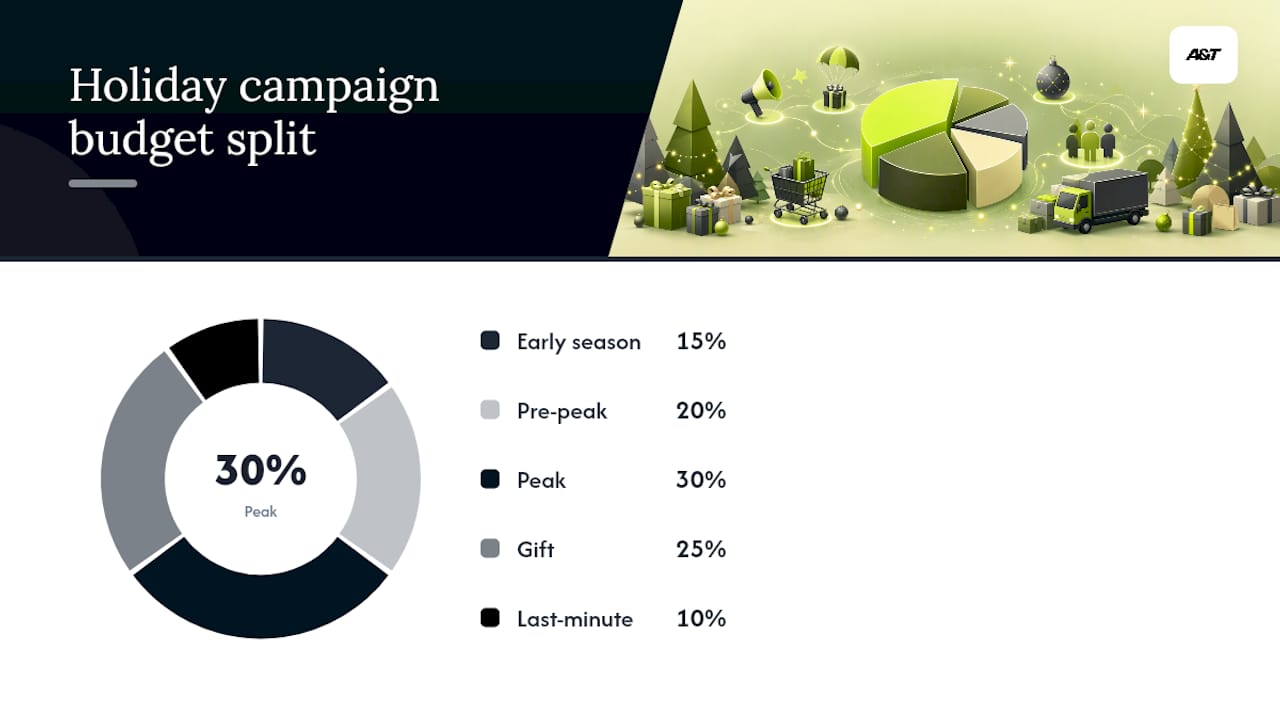
Phase your budget | Split spend roughly 15/20/30/25/10% across early, pre-peak, peak, gift, and last-minute windows. |
Protect email deliverability | Warm sending volume and audit SPF, DKIM, and DMARC at least three months before peak. |
Plan retention before December ends | Build post-purchase and January win-back flows so holiday buyers return in Q1. |
Get agency support for peak coordination | A&T Digital manages Google Ads and Meta campaigns together to keep phasing and tracking aligned during peak week. |
Table of Contents
Planning and Campaign Calendar: Timeline Template and Owners
Is Your Website Ready for Holiday Traffic?
Building Creative and Content That Converts by Phase
Getting Inventory, Packaging, and Shipping Right
What Channels and Budget Split Work Best for Holiday Ads?
What Should You Track for Reliable Holiday Attribution?
Staffing Support and Setting Realistic SLAs
Pre-Launch QA and What to Do When Something Breaks
Turning Holiday Buyers Into Repeat Customers
What Benchmarks Should You Plan Around for 2026?
What Legal Rules Apply to Holiday Promotions?
How Should You Segment Customers for the Holidays?
Where Do Influencers and Affiliates Fit in Holiday Campaigns?
How Do You Handle a Campaign Crisis in Real Time?
Planning Your Holiday Email Calendar
Sources
Planning and Campaign Calendar: Timeline Template and Owners
The holiday season now runs from October through January, not just Black Friday to Christmas. Retailer events like Prime Big Deal Days have pulled real demand into October, so a campaign calendar that starts in November is already behind.
Break the season into six phases, each with its own job:
Phase | Timing | Primary focus | Key owner |
|---|---|---|---|
Data & infrastructure | Late summer (August) | Feed audits, inventory sync, pixel checks | Analytics/ops |
Segmentation & warm-up | September | Build audiences, warm email/SMS sending | Lifecycle/CRM |
Creative testing | October | Test hero creative, build audiences cheaply | Creative/paid media |
Peak scale | November | Shift budget to winning creative and audiences | Paid media |
Gift & cutoffs | December | Gifting messaging, shipping deadline urgency | Marketing/ops |
Retention | January | Win-back flows, loyalty invites | Lifecycle/CRM |
Assign a deliverable, an owner, and a due date to each milestone: content brief, creative sign-off, feed audit, inventory sync, and load test. Enterprises frequently lack real-time data access, which is exactly why the August infrastructure phase can't slip.
For budget phasing, a workable split looks like Early season 15%, Pre-peak 20%, Peak 30%, Gift 25%, and Last-minute 10%, based on typical CPM patterns.
Pro Tip: Lock your hero offer and creative concept by late August. Teams that wait until November to finalize their discount structure end up discounting deeper than planned just to hit revenue targets, and that margin never comes back.
Is Your Website Ready for Holiday Traffic?
Checkout is where holiday revenue dies quietly. A slow mobile page or a broken discount code doesn't announce itself. It just costs you the sale.
Run these checks before October traffic arrives:
Test mobile Core Web Vitals, especially Largest Contentful Paint, using PageSpeed Insights or GTmetrix.
Confirm guest checkout works without forcing account creation.
Verify wallet payments (Apple Pay, Google Pay, Shop Pay) complete end to end on mobile.
Test discount code combinations. Stacked codes are a common source of margin-destroying bugs.
Check for third-party app race conditions during high-concurrency checkout events.
Then walk through the customer's actual path:
Confirm sold-out products are hidden or clearly labeled, not just left live with a spinning "add to cart" button.
Display shipping cutoff dates directly on product and cart pages, not buried in a shipping policy link.
Simplify the banner hierarchy so the current promotion is obvious in three seconds or less.
Make sure checkout progress indicators work on mobile screens, not just desktop.
Pro Tip: Run a live shipping cutoff countdown on your cart page during December. It creates urgency without requiring a discount, and it answers the exact question anxious last-minute shoppers are asking.
Building Creative and Content That Converts by Phase
Your October creative should teach. Your Black Friday creative should sell a deal. Your December creative should sell a gift. Running the same static ad across all three phases raises your cost per acquisition as relevance drops with every week that passes, since creative needs to evolve alongside shopper intent.
Build your production calendar backward from launch dates:
Product photography and hero imagery: shoot and approve by mid-September.
Short-form video (6 to 15 seconds) for Meta and TikTok: produce in September, finalize by early October.
User-generated content requests: send to past customers by late August so you have usable footage in time.
Gift guides and bundle pages: draft copy by late September, publish by mid-October.
On-site merchandising matters as much as the ads pointing to it:
Build dedicated sale landing pages instead of dumping traffic on your homepage.
Add trust badges, review counts, and price-anchoring ("was $80, now $52") near the buy button.
Keep shipping cutoff dates visible in gift guide copy, not just checkout.
Consider sequencing a single creative spine, a hero idea supported by hub content and help pages, from late summer through January rather than treating each phase as a disconnected campaign.
Pro Tip: Approve your December gifting creative in October. Studios and freelancers book solid by mid-November, and last-minute creative requests during peak week rarely come back on time.
Getting Inventory, Packaging, and Shipping Right
Nothing tanks a holiday campaign faster than an ad driving traffic to a product you can't actually ship. Forecast demand using last year's Black Friday and Cyber Monday uplift multipliers, then add safety stock on top, factoring in supplier lead times that tend to stretch during peak season.

Shipping cutoffs need to be visible everywhere a customer might check them:
Service level | Typical cutoff | Where to display it |
|---|---|---|
Standard ground | 1 to 2 weeks before holiday | Product page, cart, order confirmation email |
Expedited (2-3 day) | 5 days before holiday | Checkout banner, shipping FAQ |
Overnight/express | 1 to 2 days before holiday | Homepage banner, cart page |
Build contingency logic before you need it: substitution suggestions when an item sells out, back-in-stock alerts tied to email capture, and a clear escalation path with your logistics partner if a shipment stalls.
Pro Tip: Rewrite your returns policy copy for the holiday window specifically. Extending your return deadline to mid-January, and saying so clearly on product pages, removes a real purchase hesitation for gift buyers.
What Channels and Budget Split Work Best for Holiday Ads?
Your channel mix should reflect where holiday shoppers actually make decisions, not just where you spent last year; see this partner article on unifying customer experience for ideas on omnichannel marketing strategies. That means retail media for high-intent discovery, paid search and Shopping for capture, Meta and TikTok for volume and testing, and email and SMS for the conversions you already own.
Run through this checklist by channel:
Retail media: set up product listings early. Retail media captured more than $10 billion in incremental ad dollars in 2025 alone, and its closed-loop measurement is a real advantage when budgets tighten.
Paid search and Google Shopping: audit your feed for GTIN accuracy and price parity before scaling spend.
Meta and TikTok: use reels and carousels for October testing, then scale winning formats into peak.
CTV: reserve for top-of-funnel awareness if your budget supports it; skip it if resources are tight.
Email and SMS: these are your highest-margin conversion channels during peak, since there's no media cost per impression.
For audiences, work in tiers: past purchasers first, warm site visitors second, lookalikes third. Refresh your remarketing lists weekly during peak, since a list built in September goes stale fast once new traffic starts flowing in November.
A workable budget phasing model:
Early season (October): 15% of budget, focused on testing.
Pre-peak (early November): 20%, expanding proven audiences.
Peak (BFCM week): 30%, scaling what's already working.
Gift season (December): 25%, shifting messaging to gifting.
Last-minute (final week before holidays): 10%, urgency-driven.
October CPMs run 20 to 35% lower than November on both Meta and Google, which is the real reason testing early pays off twice: cheaper data now, sharper targeting later.
What Should You Track for Reliable Holiday Attribution?
Bad tracking during peak doesn't just cost you data. It costs you budget decisions made on wrong numbers. Audit these events before October traffic ramps: purchase, add_to_cart, checkout_start, subscription, coupon_use, and shipping_method selected.
Check your Shopping and retail media feeds for the same accuracy issues that quietly inflate CPA:
Audit item | What to check | Why it matters |
|---|---|---|
Product IDs | Match across feed, site, and ad platform | Mismatches cause disapproved listings |
GTIN accuracy | Verify against manufacturer data | Wrong GTINs hurt Shopping visibility |
Price parity | Feed price matches live site price | Mismatches trigger suspensions |
Pixel firing | Test each event in browser dev tools | Silent failures skew attribution |
Your reporting dashboard needs to answer one question at all times: is this spend making money? Track ROAS, CPA, incremental revenue, new customer rate, contribution margin, and repeat purchase rate side by side, not in separate reports.
Pro Tip: Run a simple holdout test: pause ads to 10% of a warm audience segment during peak week and compare their purchase rate to the exposed group. That's the cleanest read you'll get on true incremental lift, and it costs you almost nothing.
Staffing Support and Setting Realistic SLAs
Support tickets spike the moment your first big promotion goes live, often before your fulfillment team even sees the order volume. Forecast contact volume against last year's peak, add overflow channels like chat or a temporary support contractor, and train staff on your specific promo terms and cutoff dates before launch, not during it.
Pre-write FAQ answers for the questions you know are coming:
Shipping cutoffs by service level and what happens if a customer misses one.
Return and exchange windows, including any holiday extension.
Payment options like buy now, pay later, and how refunds are timed against them.
Set SLA targets that are realistic for peak volume: first response under 4 hours, order resolution under 48 hours. Support needs a direct line to fulfillment and marketing so a stockout or shipping delay gets flagged and communicated before customers start asking, not after.
Common holiday support question: How fast should refunds process during peak? Aim for the same timeline as your normal policy, but flag it clearly on your returns page so customers aren't guessing during a high-anxiety week.
Pre–Launch QA and What to Do When Something Breaks
Test everything a customer will actually touch before you spend a dollar promoting it.
Click every link in every ad and email, including UTM parameters.
Test personalization tokens with real customer data, not placeholder names.
Verify discount logic across every combination you plan to run.
Check rendering on the three most common device and browser combinations in your analytics.
Simulate last year's peak traffic plus a buffer, and watch server response time and checkout completion rate as your key signals.
Have a rollback plan written down, not just assumed: know exactly how to revert a broken deployment within minutes.
Designate one person as incident lead during peak week.
Set an escalation chain so a checkout bug reaches a developer within 15 minutes, not after a Slack thread scrolls past it.
Draft holding language for customer-facing channels in advance, so a fix doesn't wait on a marketing sign-off during a live outage.
Turning Holiday Buyers Into Repeat Customers
The real test of a holiday campaign isn't December 25th. It's whether that customer buys again in February.
Build a post-purchase flow with clear timing: a welcome message within a day of delivery, product education a few days later, a cross-sell around week two, and a loyalty program invite by week three. Track cohort-specific metrics separately from your regular customer base: repeat purchase rate, lifetime value of the holiday cohort, and gift card redemption rate.

January is an underused retention window. Exchange requests and gift card redemptions are structured re-engagement moments; a customer redeeming a gift card is already back on your site with intent to buy, and a well-timed cross-sell in that flow converts far better than a cold discount blast.
Pro Tip: Send your first win-back email to holiday buyers around January 10, right after the returns rush settles but before the post-holiday motivation fades. Frame it around a new arrival or a "complete the set" angle tied to what they already bought, not a generic discount.
What Benchmarks Should You Plan Around for 2026?
Global ecommerce growth projections from Statista's market outlook support conservative but real year-over-year growth assumptions for holiday budget sizing, rather than the aggressive multipliers some planning decks assume.
Use these benchmark ranges as planning inputs, not guarantees:
KPI | Suggested target | Planning implication |
|---|---|---|
Blended ROAS | Track against your own margin floor | Set a hard cutoff below which spend pauses |
Email revenue share | 20 to 30% of total holiday revenue | Justify early list warm-up investment |
New customer rate | Track by channel, not blended | Retail media often skews new-customer heavy |
Cart abandonment | Expect a rise during peak traffic spikes | Budget for abandonment email/SMS flows |
Since retail media spend is forecast to climb to $71.09 billion in 2026, allocate testing budget to it in October while CPMs are still manageable, rather than entering cold in November.
What Legal Rules Apply to Holiday Promotions?
Holiday urgency tactics get scrutinized more than any other campaign type, because "limited time" claims and countdown timers are exactly what regulators watch for. In the United States, the FTC's rules on deceptive pricing and endorsements apply directly to Black Friday and Cyber Monday advertising: a "was" price must reflect a real prior selling price, not an inflated reference number invented for the sale.
Advertised discounts need to be accurate at the moment of purchase, not just at the moment the ad ran. If a "40% off" banner is live but a specific product has sold through its discounted inventory, the checkout price needs to match what the customer was promised, or you risk both customer complaints and regulatory exposure.
Sweepstakes and giveaway promotions tied to holiday campaigns carry their own rules: clear terms, no purchase-required alternatives where legally mandated, and disclosed odds. If influencers or affiliates promote your holiday offers, their posts need clear and conspicuous disclosure of the paid or gifted relationship. That's not optional dressing. It's an enforceable requirement under FTC endorsement guidelines.
Email and SMS marketing carry their own compliance layer during peak volume increases: CAN-SPAM requirements for unsubscribe links and sender identification, and TCPA consent requirements for SMS, don't relax just because you're sending more volume in November. If anything, higher volume during peak means more opportunities for a compliance gap to surface. Review your promotional email templates and SMS opt-in language before your first Black Friday send, not after a complaint arrives.
How Should You Segment Customers for the Holidays?
A single "holiday shoppers" segment wastes the targeting precision you spent all year building. Split your list by purchase behavior, not demographics alone.
Start with three practical tiers: past purchasers who bought in the last 12 months, warm site visitors who browsed but didn't buy, and cold lookalike audiences built from your best customers. Each tier deserves different messaging. Past purchasers respond well to "we saved this for you" personalization and early access. Warm visitors need a nudge, often a smaller discount or free shipping threshold, to convert what they already considered. Cold audiences need the strongest hook, usually your hero offer, since they have no relationship with your brand yet.
Layer in gift-giving intent where you can detect it. A customer browsing kids' products in early December is likely gift shopping, not shopping for themselves, and your email or on-site messaging should reflect that with gift-wrap prompts and delivery-by-Christmas countdowns rather than generic product recommendations.
VIP or high-LTV customers deserve their own track entirely: early access to sale pricing, a dedicated support line, or a small gift-with-purchase that a mass discount blast would never justify economically. Personalization at this level doesn't require complex machine learning. A well-segmented email list, tagged by purchase history and browsing behavior, gets you most of the value at a fraction of the technical lift.
Where Do Influencers and Affiliates Fit in Holiday Campaigns?
Influencer and affiliate partnerships work best as amplification for a creative concept you've already validated, not as a standalone strategy invented in November. Brief your partners with the same phase-based messaging you're running elsewhere: educational content in October, deal-focused content around Black Friday and Cyber Monday, and gifting angles in December.
Lock affiliate commission structures and any holiday-specific bonus rates by September. Affiliates plan their own content calendars in advance, and a late-arriving commission bump rarely gets prioritized into an already-packed publishing schedule.
Gift guides are the single highest-performing affiliate format during the holidays, since they match exactly how gift shoppers search and browse. Provide affiliates with clean product data, accurate pricing, and real-time stock status, so their content doesn't send traffic to a sold-out item, which damages both your conversion rate and the affiliate relationship.
Require clear FTC-compliant disclosure on every sponsored post and affiliate link. This protects the brand as much as the creator; regulatory attention on paid endorsements tends to spike specifically during high-spend holiday months.
Track affiliate and influencer performance the same way you track paid media: attributed revenue, not just click volume or follower counts. A macro-influencer with broad reach but low purchase intent often underperforms a smaller creator whose audience trusts specific product recommendations.
How Do You Handle a Campaign Crisis in Real Time?
Peak week will produce at least one problem you didn't plan for, whether it's a stockout, a broken discount code, or a shipping carrier delay affecting thousands of orders. What separates a manageable hiccup from a brand crisis is how fast you notice and respond.
Set up real-time monitoring on your core metrics, conversion rate, checkout completion rate, and site speed, with alert thresholds that flag a problem within minutes, not hours.
Designate a single decision-maker for peak week who can approve emergency actions, pausing an ad set, issuing a public statement, or rolling back a site change, without waiting on a full approval chain. Speed matters more than perfect consensus when checkout is actively broken.
Draft holding statements in advance for the scenarios you can predict: a shipping delay, a site outage, a sold-out promotion. Having template language ready means your support and social teams can respond within the hour instead of scrambling to write something under pressure while customers are already frustrated in your replies.
Review performance daily during peak, not weekly. If a campaign's CPA jumps 40% overnight, that's a signal to shift budget immediately, not to wait for Monday's report. The phase-based budget structure you built in the planning phase should include built-in flexibility to reallocate spend mid-week when one channel underperforms and another is outpacing forecast.
Planning Your Holiday Email Calendar
Email is where holiday revenue compounds fastest, but only if your sending infrastructure can handle the volume increase without triggering spam filters. Start warming your sending volume and auditing SPF, DKIM, and DMARC authentication at least three months before peak; a sudden jump in send volume the week of Black Friday is one of the most common causes of deliverability problems during Cyber Week.
Structure your calendar by phase, matching the same October to January arc as your paid media:
October: educational content, early access teasers, list-building incentives.
Early November: countdown emails building anticipation for Black Friday and Cyber Monday.
Peak week: deal-focused sends, cart abandonment follow-ups with tightened timing.
December: gifting guides, shipping cutoff reminders, last-chance urgency.
Late December: gift card promotion for post-Christmas redemption.
January: win-back sequences and loyalty program invitations.
Shorten your cart abandonment trigger window to 15 to 20 minutes during peak days, since holiday shoppers move faster and a standard 24-hour delay often arrives after they've already bought elsewhere. Segment your sends by the same purchase-behavior tiers you use for paid media, so your highest-value customers aren't getting the same generic blast as a first-time browser.
Applying This Checklist at Scale
The single biggest failure point when running this checklist across multiple brands or a large catalog isn't the strategy. It's coordination. Creative gets approved late, tracking breaks quietly, and media budgets shift without anyone confirming inventory can support the demand.
That's precisely the gap an agency team fills during peak week: one group holding creative, media, and tracking in sync so a stockout or feed error doesn't silently drain your ROAS while everyone assumes someone else caught it.
How A&T agency Supports Your Holiday Campaign
Running this checklist alone means juggling media buying, feed audits, and creative production at the exact moment your traffic and stakes are highest. A&T Digital runs that coordination as a dedicated team, managing Google Ads and Shopping feed setup alongside Meta creative and audience scaling, so your paid channels move on the same phase-based timeline instead of drifting apart during peak week.
That includes setting up incrementality holdout tests and managing retail media buys with the closed-loop measurement this checklist recommends. If you're heading into Q4 without a dedicated media team watching ROAS daily, start with a campaign audit before October: book a Google Ads review and get a clear read on where your current setup will hold up under peak traffic and where it won't.
Sources
FAQ on holiday marketing: How marketers can win in a longer, leaner season
The Ecommerce Holiday Readiness Checklist for Marketing Teams - SAP Engagement Cloud