How to Launch Event Ads That Drive Real Registrations
Posted on
Marketing
Posted at

Most event ads fail before they even launch. Businesses pour thousands into campaigns without proper tracking, mismatched objectives, or unclear audience targeting. The result? Empty seats and wasted budgets. A structured, platform-aware launch process changes everything. When you set up Meta, Google, and LinkedIn event ads correctly from the start, you drive measurable attendance and ROI. This guide walks you through the exact preparation, launch, and optimization steps that turn event ads into revenue engines.
Table of Contents
What you need to launch event ads successfully
Step-by-step: Launching event ads on Meta (Facebook and Instagram)
How to promote events with Google Ads
Running LinkedIn event ads for professional audiences
Optimization, troubleshooting, and measuring event ad performance
Get expert help to maximize your event ad impact
Frequently asked questions
Key Takeaways
Point | Details |
|---|---|
Preparation is critical | Verify tracking, permissions, and payment well before launch to avoid wasted budget. |
Platform strategies differ | Meta, Google, and LinkedIn each require unique campaign setups and budgets for event ads. |
Test and optimize | Start with small budgets and continually A/B test ad creatives for 3–5 days. |
Track ROAS, not clicks | Focus on return on ad spend rather than vanity metrics for success. |
Landing page match boosts results | A dedicated, relevant landing page can double or triple event ad conversions. |
What you need to launch event ads successfully
Before you spend a single dollar, you need the right foundation. Skipping setup steps costs you conversions and inflates your cost per registration. Here's what must be in place before launch.
Essential tracking and permissions by platform:
Meta (Facebook and Instagram): Install Meta Pixel on your event landing page, verify tracking and Conversions API, confirm business permissions, and test payment methods
Google Ads: Set up conversion tracking for registrations or ticket purchases, link Google Analytics, verify billing
LinkedIn: Create a Company Page event, enable LinkedIn Insight Tag, confirm Campaign Manager access
Required assets checklist:
High-quality event images (1200x628px for Meta, 1200x1200px for LinkedIn)
Dedicated landing page with clear registration flow
Ad copy variations (3-5 headlines, 2-3 body copy options)
Budget allocation per platform
Event details finalized (date, time, location, pricing)
Pre-launch verification table:
Item | Meta | ||
|---|---|---|---|
Tracking installed | Meta Pixel + CAPI | Conversion tracking | Insight Tag |
Payment method | Active card | Active billing | Active card |
Permissions | Business Manager admin | Account access | Campaign Manager |
Landing page tested | Registration flow works | Form submission works | Event page live |
Pro Tip: Run a test transaction on your event registration page before launching ads. Complete the entire flow from ad click to confirmation email. This catches broken forms, payment errors, and tracking gaps that would otherwise burn your budget.
Integrating a creative ad strategy process at this stage ensures your visuals and messaging align with platform best practices and audience expectations.
Step by step: Launching event ads on Meta
Facebook and Instagram
Meta excels at building awareness and driving early registrations. Here's how to set up event ads that convert.
Launch sequence:
Create your Facebook Event in Events Manager or directly on your business page with complete details
Select compelling visuals that show the event experience, not just text overlays
Choose your objective in Ads Manager: Event Responses for awareness or Conversions for ticket sales
Verify pixel health in Events Manager to confirm tracking fires correctly
Define your audience using location, interests, behaviors, and lookalike audiences from past attendees
Set initial budget at $5-10 per day to test performance before scaling
Choose automatic placements to let Meta optimize across Facebook, Instagram, Stories, and Reels
Review all settings including schedule, bid strategy, and creative rotation
Publish and monitor for approval (usually within 24 hours)
When you start with small budgets and test Event Responses or ticket sales objectives, you gather performance data without risk. Once you identify winning combinations, scale budgets gradually.
Common pitfalls to avoid:
Mismatching campaign objective with tracking setup (running Conversions without pixel)
Launching without testing payment methods or business verification
Using boosted posts long-term instead of migrating to Ads Manager for control
Setting budgets too high before validating audience and creative
Warning: Policy violations and payment issues can delay your launch by 48-72 hours. Always submit ads at least one week before your event to allow time for review and fixes.
As your campaigns mature, gradually move to Ads Manager for advanced features like custom audiences, detailed reporting, and multi-ad set testing. Our Meta ad strategies guide and Facebook campaign best practices resource offer deeper optimization tactics.
Pro Tip: Create separate ad sets for cold audiences (interests, demographics) and warm audiences (website visitors, email lists). This lets you tailor messaging and budgets based on familiarity with your brand.
How to promote events with Google Ads
Google captures high-intent searchers actively looking for events like yours. Here's how to convert that intent into registrations.
Search campaign setup:
Research event keywords using Google Keyword Planner: include event type, location, date, and related terms
Create a dedicated landing page that mirrors your ad copy and focuses solely on registration
Build your Search campaign in Google Ads with manual CPC bidding to start
Write compelling ad copy with your event name, key benefit, and clear call to action in headlines
Set conversion tracking for registration completions or ticket purchases
Add negative keywords to exclude irrelevant searches (past events, competitor names, job searches)
Start with $20-50 daily budget to gather data across your keyword set
Enable ad extensions including sitelinks, callouts, and structured snippets
Monitor search terms daily for the first week to refine targeting
Why dedicated landing pages matter:
Your ad promises a specific event experience. Your landing page must deliver exactly that, with no distractions. Generic event pages or homepages dilute your message and kill conversions. A focused landing page with one clear action (register now) converts 2-5x better than multi-purpose pages.
Keyword and budget optimization table:
Keyword Type | Example | Daily Budget | Expected CPC |
|---|---|---|---|
Branded | "[Your Event Name] tickets" | $10-20 | $0.50-1.50 |
Event Type | "marketing conference Chicago" | $20-30 | $2-5 |
Problem-Focused | "how to improve digital marketing" | $15-25 | $3-7 |
Google Ads do not have native event ads, so Search campaigns targeting high-intent keywords with conversion tracking and $20-50 daily budgets deliver the best results.
Pro Tip: Review your search terms report weekly and add 10-15 negative keywords each time. This single action cuts wasted spend by 20-30% within the first month. For more advanced tactics, explore our Google Ads tips for higher ROI and Google Ads campaign launch guides.
Running LinkedIn event ads for professional audiences
For B2B events, professional conferences, or industry gatherings, LinkedIn offers precision targeting and native event promotion tools.
LinkedIn event ad checklist:
Create your event on your LinkedIn Company Page with complete details and compelling description
Set your campaign objective to Event Registrations in Campaign Manager
Add your event landing page URL for external registration tracking
Choose high-quality visuals that reflect professional event atmosphere
Stage your ads across three phases: pre-event awareness, live event promotion, post-event replay
Use accelerated delivery during your live event window to maximize visibility
Set up retargeting for post-event content or future events
Platform comparison for event ads:
Platform | Avg CPC | Best For | Targeting Strength | Min Daily Budget |
|---|---|---|---|---|
Meta | $0.50-2 | Awareness, B2C events | Interest, behavior, lookalike | $5-10 |
$2-7 | High-intent searches | Keywords, location | $20-50 | |
$5-12 | B2B, professional events | Job title, company, industry | $50-100 |
LinkedIn event ads requirecreating an event on your Company Page first, then running dynamic ads through Campaign Manager across different event stages for maximum impact.
Pro Tip: Split your LinkedIn ad sets by event stage. Run awareness ads ("Join us at...") 3-4 weeks out, urgency ads ("Last chance to register") in the final week, and replay/highlights ads post-event. Each stage needs different messaging and creative to match audience mindset.
Optimization, troubleshooting, and measuring event ad performance
Launching is just the beginning. Sustained results come from smart optimization and rapid problem-solving.
Top mistakes that kill event ad performance:
Running ads without proper conversion tracking or with broken pixels
Setting budgets and forgetting to monitor daily performance
Sending traffic to generic pages instead of dedicated event landing pages
Ignoring search terms and negative keywords on Google campaigns
Using the same creative and messaging across all platforms
Failing to retarget engaged users who didn't register
Optimization tactics that work:
A/B test 3-5 creative variations for 3-5 days to identify winners, then allocate 70% of budget to top performers
Set up retargeting campaigns for landing page visitors who didn't complete registration
Adjust bids and budgets daily during the first week, then shift to every 2-3 days
Refresh ad creative every 7-10 days to combat ad fatigue
Use post-event retargeting to promote recordings, future events, or related offers
Performance benchmarks by platform:
Metric | Meta | Google Search | |
|---|---|---|---|
CTR | 0.9-1.5% | 3-5% | 0.4-0.7% |
Conversion Rate | 1-3% | 2-5% | 0.5-2% |
Target ROAS | 3:1+ | 4:1+ | 2:1+ |
Benchmark data showsMeta CTR of 0.9-1.5%, conversion rates of 1-3%, Google Search CTR of 3-5%, and LinkedIn CTR of 0.4-0.7%, with ROAS as your key metric over vanity numbers.
Critical insight: Dedicated landing pages convert 2-5x better than generic event pages. If your conversion rate sits below 1%, your landing page is the problem, not your ads.
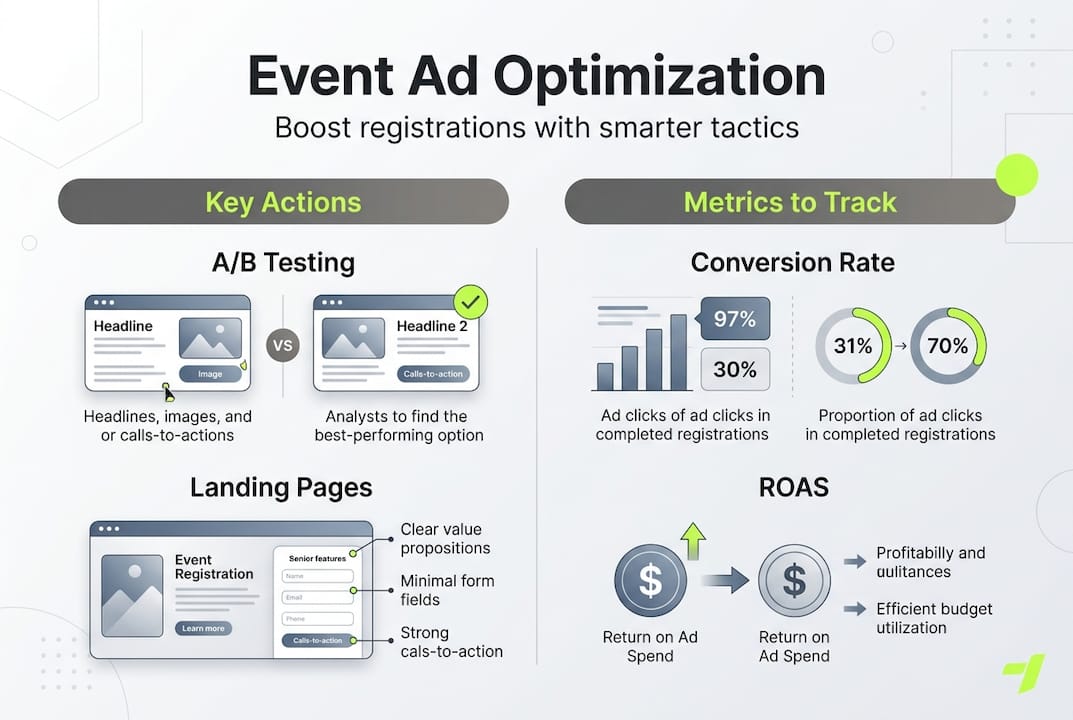
A/B testing creatives for 3-5 days is vital for event ad optimization and often reveals surprising winners that double your registration rate.
Implement systematic testing using our A/B testing in ads framework and measure what matters with our track ad performance metrics guide.
Pro Tip: Set up a weekly review cycle every Monday. Check ROAS, cost per registration, and creative fatigue metrics. Make one major change per week (new creative, audience adjustment, or budget shift) so you can measure its isolated impact.
Get expert help to maximize your event ad impact
Event ad campaigns demand constant attention, platform expertise, and rapid optimization. For small marketing teams juggling multiple priorities, that's a tall order.
We build and manage event ad systems that deliver measurable registrations and ROI. Our approach combines strategic planning, creative testing, and data-driven optimization across Meta, Google, and LinkedIn. You get the results without the meetings, the guesswork, or the wasted spend.
Whether you need focused support on Meta ads management, Google Ads management, or a complete multi-channel ad strategy, we handle the complexity while you focus on delivering an exceptional event experience.
Ready to fill seats and maximize your event ROI? Let's build a campaign that works.
Frequently asked questions
What is the ideal starting budget for event ads on each platform?
Start with $5-10 daily for Meta, $20-50 for Google Search, and $50-100 for LinkedIn to test and optimize performance before scaling.
How do you track real event conversions from ads?
Use Meta Pixel and Google conversion tracking or LinkedIn event analytics, and always test with real sign-up transactions before launch to verify tracking accuracy.
What is the most important KPI for event ads?
ROAS (return on ad spend) is the primary KPI to evaluate event ad profitability and performance, not vanity metrics like impressions or reach.
Are A ∕ B tests worth running for small event ad budgets?
Yes, A/B testing creatives for 3-5 days often improves results and lowers wasted spend, even with budgets under $500.
What is the best platform for B2B event ads?
LinkedIn delivers the highest professional audience quality but often at higher cost per click compared to Meta and Google, making it ideal when targeting decision-makers justifies the premium.