Google Display Ads: Proven Strategies for Measurable ROI
Posted on
Marketing
Posted at

Google Display Ads are a powerful full-funnel tool for SMBs, driving brand awareness, remarketing, and assisted conversions. They leverage extensive reach, advanced targeting options, and AI-driven automation to improve ROI when properly monitored and optimized. Treat Display as a long-term investment that enhances overall marketing performance rather than expecting immediate results.
Google Display Ads have a reputation problem. Most business owners write them off as a brand awareness play, something you run when you have budget to burn, not a channel that drives real, trackable results. That perception is costing SMBs real money. Google Display ads are designed to reach customers earlier in the buying cycle and re-engage them later through remarketing, making them a full-funnel tool when used correctly. This article breaks down how Display Ads actually work, how to measure their impact, and what strategies consistently deliver ROI for small and mid-sized businesses.
Table of Contents
How Google Display campaigns drive the full customer journey
Why most SMBs underuse Google Display (and how to do better)
Key Takeaways
Point | Details |
|---|---|
Full-funnel impact | Google Display Ads engage audiences throughout the buying journey, not just at the conversion stage. |
AI and smart bidding | Using smart bidding and AI targeting improves efficiency and extends your ad reach. |
Dynamic remarketing | Remarketing with personalized ads increases conversions by re-engaging interested leads. |
Measure beyond last click | Evaluate Display Ads by looking at both direct and assisted conversions for true ROI clarity. |
SMB accessibility | Flexible budgets and simple tools make Display Ads an effective option for smaller businesses. |
What makes Google Display Ads unique for SMBs?
To evaluate ROI honestly, you need to understand what makes Google Display uniquely accessible and powerful for smaller businesses. Display does not compete on the same terms as Search. It works differently, reaches differently, and converts differently.
The Google Display Network, commonly called the GDN, reaches over 35 million websites, apps, and Google properties like YouTube and Gmail. That scale is not just impressive on paper. It means your ads can follow a potential customer from a news site to a recipe blog to a sports app, all within a single day. For SMBs with limited brand recognition, that repeated exposure builds familiarity fast.
Targeting options available in Google Display campaigns:
Demographic targeting: Reach users based on age, gender, household income, or parental status
Affinity audiences: Target people based on long-term lifestyle interests and habits
In-market audiences: Reach shoppers who are actively researching and comparing products in your category
Custom intent audiences: Build your own audience based on specific search terms and URLs
Contextual targeting: Place ads on web pages that match specific topics or keywords
Remarketing lists: Re-engage people who have visited your website or interacted with your brand
Display campaignscan be set up with AI-supported components, including optimized targeting, smart bidding, and responsive ad formats, which means you do not need a large team or technical expertise to get started.
Feature | Google Display Ads | Traditional Digital Banners |
|---|---|---|
Targeting precision | High (AI, behavioral, contextual) | Low (site-specific only) |
Ad format flexibility | Responsive, auto-optimized | Fixed dimensions required |
Budget control | Full control, any budget | Often requires minimums |
Remarketing capability | Built-in, dynamic | Limited or add-on |
Learning and optimization | AI-powered, ongoing | Manual adjustments only |
This is also where the role of Google Ads for small businesses becomes clearer. You are not just buying ad space. You are buying access to an intelligent system that improves over time, learns your audience, and reallocates budget toward what works.
How Google Display campaigns drive the full customer journey
With a firm grasp on the Display platform's fundamentals, we can map out how these ads influence the complete buying journey.
Most people take several touchpoints before they purchase. A prospect might see your Display ad while reading an article, search your brand name three days later, click a Search ad, and then convert. If you only measure that last click, Display gets zero credit. That is the measurement problem most SMBs run into, and it distorts their entire view of performance.

Display campaigns help reach people at all stages of the buying cycle, from those with demonstrated interests all the way to customers who are just about to buy. That is not a small claim. It means one channel can serve multiple objectives simultaneously.
Here is how Display typically operates across the funnel:
Awareness stage: A prospective customer encounters your display ad for the first time on a site they trust. They may not click, but they register your brand name and offer. This is called a view-through, and it has measurable downstream effects.
Consideration stage: That same person sees a second or third ad, perhaps with a different creative. They visit your site. They are now in your remarketing audience.
Purchase stage: A targeted remarketing ad brings them back. They convert. The last click may be Search or Direct, but Display assisted that conversion.
Loyalty stage: Post-purchase Display ads reinforce your brand, promote complementary products, and increase lifetime value.
This sequence is not theoretical. Display can improve ROI when treated as a full-funnel system rather than a last-click channel, driving assisted conversions and branded search lift that supports both search and organic performance.
Attribution model | How Display is credited | Best for |
|---|---|---|
Last click | Display gets no credit | Direct-response only |
Linear | Credit spread across all touchpoints | Brand and conversion balance |
Time decay | Recent interactions weighted more | Short purchase cycles |
Data-driven | AI allocates credit based on patterns | Mature accounts with data |
Understanding this distinction is central to boosting ROI with digital marketing. The business owners who succeed with Display are the ones who stop measuring it like Search and start measuring it like the awareness and consideration engine it truly is.
Smarter strategies: AI, smart bidding, and targeting
Getting the most out of Google Display happens when you tap into its most advanced features. And right now, those features are more accessible than ever.
Display campaigns can be configured with AI-powered components like optimized targeting and smart bidding strategies, both of which reduce manual effort and improve performance over time. Here is what that means practically.
Optimized targeting is Google's default setting for Display campaigns. It automatically finds additional audiences beyond those you have manually specified, identifying users who are likely to convert based on patterns in your campaign data. If your current remarketing list is converting well, optimized targeting looks for people with similar digital behaviors and expands your reach to them.
Smart bidding strategies available for Display campaigns include:
Target CPA (cost per acquisition): Set the average amount you want to pay per conversion, and Google adjusts bids automatically
Target ROAS (return on ad spend): Optimizes for conversion value relative to spend
Maximize conversions: Spends your budget to get as many conversions as possible
Maximize conversion value: Focuses on total revenue rather than conversion count
"Automation without oversight is just guessing with extra steps. Set your goals, monitor your signals, and let the machine do the heavy lifting, but check in regularly."
Responsive display ads simplify creative management significantly. You upload multiple headlines, descriptions, images, and logos, and Google automatically tests combinations to identify what performs best across placements. You do not need a designer for every variation.
Pro Tip: Start with a tighter manual audience before enabling optimized targeting. Give the algorithm two to three weeks of conversion data first. That way, it has something meaningful to optimize toward rather than casting too wide a net from day one.
For a detailed breakdown on getting returns from your ad spend, see our guide on optimizing Google Ads ROI. The principles there apply directly to Display campaign management.
Balancing automation and human control matters. You should review audience insights regularly, pause low-performing placements, and adjust creative when click-through rates drop. Automation handles bidding and audience expansion efficiently. Your job is to feed it the right inputs.
Remarketing and dynamic strategies for higher ROI
For those ready to take targeting and ROI further, remarketing with Display is where strategy becomes truly personalized.
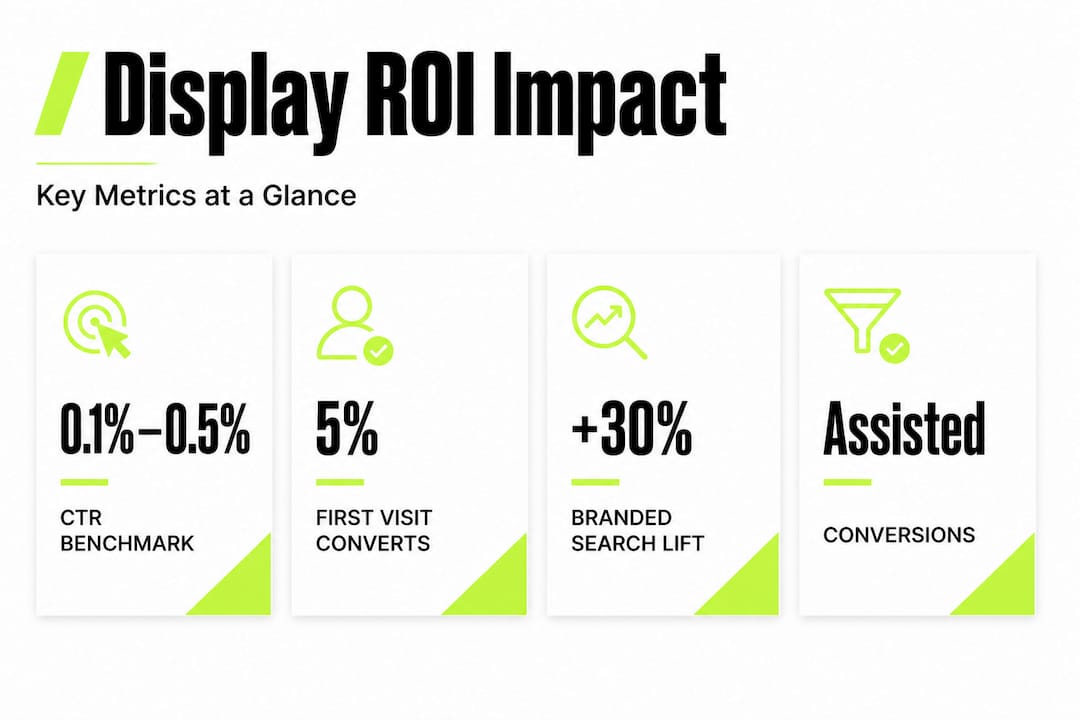
Most website visitors do not convert on their first visit. Studies consistently show that fewer than 5% of first-time visitors complete a purchase or inquiry. Remarketing brings the other 95% back, and Display is the most effective channel for doing it at scale.
Dynamic remarketingtakes personalization a step further by using product or service data to show each visitor ads featuring the exact items they viewed. For an e-commerce business, that means someone who looked at a specific jacket sees that jacket in the ad, not a generic brand message. For a service business, it means someone who visited your pricing page sees messaging tied to that specific service.
How to build an effective Display remarketing campaign:
Install your Google tag and set up audience lists. Define audiences based on pages visited, time on site, and actions taken. A visitor who reached your checkout page is a higher-intent audience than someone who only read a blog post.
Segment your audience by intent level. Create separate ad groups for cart abandoners, product viewers, past customers, and general site visitors. Each group needs different messaging.
Create personalized ad creative for each segment. Cart abandoners respond to urgency and incentives. Past customers respond to cross-sell and loyalty messaging. Do not use one ad for everyone.
Set appropriate frequency caps. Showing the same ad 20 times in a week annoys people. Cap frequency at 3 to 5 impressions per user per day to maintain effectiveness without causing fatigue.
Exclude recent converters. Always exclude people who just purchased or signed up. Showing acquisition ads to existing customers wastes spend and looks out of touch.
"The businesses we work with that see the strongest Display ROI are the ones that treat remarketing as a conversation, not a broadcast. Relevance wins every time."
For more tactical detail on dynamic remarketing strategies and how retargeting drives conversions, we have dedicated guides that go deeper on each element.
Pro Tip: For service businesses without a product catalog, use landing page content and service categories to build dynamic messaging. Pair this with a well-structured performance marketing approach to keep every step of the campaign accountable. Understanding why remarketing matters from a strategic standpoint will also help you make the case internally for dedicating budget to it.
How to track ROI and measure Display Ad success
Knowing how to track your results ensures you never have to question whether Display is pulling its weight.
Measurement is where most SMBs fall short with Display. They look at clicks and impressions, see low direct conversion numbers, and shut the campaign off. That is a mistake. The right metrics tell a more complete story.
Key metrics to track for Google Display campaigns:
Impressions: Total number of times your ad appeared. Use this to measure reach and frequency.
Click-through rate (CTR): Percentage of impressions that generated a click. A low CTR is normal for Display (often 0.1% to 0.5%) and does not mean the campaign is failing.
View-through conversions: Users who saw your ad but did not click, and later converted through another channel. This is a critical metric for understanding Display's indirect impact.
Assisted conversions: Conversions where Display appeared somewhere in the path, but was not the final click. Found in your attribution reports.
Cost per acquisition (CPA): Total spend divided by total conversions. Compare this across channels using consistent attribution.
Return on ad spend (ROAS): Revenue generated relative to ad spend. For e-commerce, this is the clearest profitability measure.
Metric | What it measures | Benchmark target |
|---|---|---|
CTR | Direct engagement | 0.1% to 0.5% |
View-through conversions | Indirect influence | Varies by industry |
Assisted conversions | Multi-touch impact | Track trends over time |
CPA | Conversion efficiency | Below target CPA |
ROAS | Revenue return | Above 200% minimum |
Display advertising drives assisted conversions and branded search lift that later supports search and organic performance, meaning its value compounds over time. This is why looking at performance in 30 to 90 day windows gives a more accurate picture than week-over-week snapshots.
Use Google Analytics 4 alongside Google Ads to see the full conversion path. The path analysis report shows you exactly where Display appeared relative to the final conversion. For practical guidance on scaling Google Ads for better ROI and tracking ad performance metrics, both resources will sharpen your ability to make data-backed decisions.
Why most SMBs underuse Google Display (and how to do better)
Let us step back and share what most guides overlook about the real-world use of Google Display by SMBs.
The biggest mistake we see is treating Display as a set-it-and-forget-it channel. Business owners launch a campaign, let it run for two weeks, see no direct sales, and declare it a failure. That is not a Display problem. That is a measurement and strategy problem.
The second mistake is expecting Display to behave like Search. Search captures intent. Display creates it. Measuring them the same way is like judging a billboard by how many people walk into the store immediately after seeing it.
Here is the mindset shift that changes everything: Display is an investment in future conversions, not a substitute for them. When you run Display alongside Search, your Search ads perform better. Your branded search volume increases. Your organic click-through rates improve. The whole system lifts because more people recognize your name before they encounter your other ads.
The businesses that get the most from Display are the ones that align creative strategy with audience segmentation, set clear measurement frameworks before launch, and give campaigns enough time and data to optimize. They treat it as part of a system, not a standalone experiment.
Why SMBs should use Google Ads comes down to access: access to reach, targeting, and automation that used to require large agency relationships and massive budgets. Display specifically levels the playing field by letting you build brand presence and retarget warm audiences for a fraction of traditional media costs.
Do not abandon Display because it did not convert in week one. Diagnose it. Adjust it. Measure it correctly. That is where the real ROI lives.
Take your Google Display campaigns to the next level
If your team is ready to move from insights to real results, here is where to get hands-on support.
We build and manage Google Display campaigns that are accountable from day one. Our approach connects targeting strategy, creative development, audience segmentation, and measurement into one coherent system. No guesswork. No wasted spend. Just campaigns built to move the needle. Whether you need expert Google Ads management or want to explore how Meta Ads management fits into your broader paid media strategy, we work with SMBs who are serious about performance. Let us show you what Display can actually do for your business.
Frequently asked questions
Is Google Display advertising cost effective for small businesses?
Yes, Google Display Ads allow flexible budgets and can deliver strong ROI when targeted and measured properly. AI-supported components like smart bidding help smaller businesses compete efficiently regardless of budget size.
How does Display help beyond direct conversions?
Display Ads increase brand familiarity and assist conversions by driving branded search and higher engagement in future campaigns. Treating Display as a full-funnel system captures its true value through assisted conversions and search lift.
What is dynamic remarketing and why does it matter?
Dynamic remarketing shows personalized ads to past visitors using the specific products or services they viewed, which directly increases conversion rates. Dynamic remarketing is supported natively within Display, Performance Max, and App campaigns.
How do I know if my Google Display Ads are working?
Monitor view-through conversions, assisted conversions, CPA, and ROAS alongside your standard click metrics for a complete picture. Attribution measurement requires looking beyond immediate conversions to understand Display's full contribution to revenue.


